
Nginx 配置文件:常用配置项与典型场景
Nginx 的所有能力——静态站点、反向代理、负载均衡、缓存、限流——全部通过一份配置文件组织起来。把常用配置项的用途和坑摸清楚,是玩转 Nginx 的前提。这篇按”文件结构 → 高频配置项 → 典型场景”的顺序过一遍,关键行为配了容器实测。
按目标跳转:改整体行为看”全局块”,调并发看 worker_connections,上反代看”反向代理”,上 HTTPS 看”SSL/TLS”,多机分发看”负载均衡”,提速看”缓存”,做加固看”安全配置”。
配置文件结构
主配置文件通常位于 /etc/nginx/nginx.conf 或 /usr/local/nginx/conf/nginx.conf,结构上分为全局块、events 块和 http 块:
1 | # 全局块 |
全局块管进程和日志这类整体行为,events 块管连接处理,http 块管所有 HTTP 相关的配置,日常改得最多的就是 http 块。
改动配置的标准动作是一条固定流水线:vim nginx.conf 改完 → nginx -t 验语法 → nginx -s reload 平滑生效 → curl 或浏览器验证行为。四步走完才算一次完整的变更,跳过中间两步直接重启的写法,事故率显著更高——nginx -t 拦住的那半数字法错误,每一个都会让 reload 失败、新旧配置并存。
高频配置项
user
定义 worker 进程的运行用户:
1 | user www; |
master 以 root 启动(要绑 80/443 特权端口),随后把 worker 降到这个低权限用户下干活——就算 worker 被打穿,攻击者拿到的也只是个普通用户。
worker_processes 与 worker_connections
两个决定并发上限的参数:
1 | worker_processes auto; # 全局块:worker 数,auto = CPU 核心数 |
整套服务的最大并发 ≈ worker 数 × worker_connections。worker_processes auto 让 Nginx 自己探测核心数;worker_connections 可以设大,但前提是系统资源跟得上——文件描述符上限(ulimit -n)、内存都要留够,否则只是把压力从 Nginx 挪给操作系统。另外注意连接数不等于请求数:浏览器对一个站点常开 2-6 条连接并保持复用,长连接下这些连接一直挂着,容量要按峰值并发连接数估算,而不是按每秒请求数。
error_log 与 access_log
1 | error_log /var/log/nginx/error.log warn; |
排障先看 error_log,流量分析靠 access_log。log_format 定义日志字段,级别通常设 warn 避免膨胀过快。
include
1 | include /etc/nginx/conf.d/*.conf; |
把不同站点的配置拆到独立文件,主配置保持干净。注意一处语法错误会让整个 reload 失败——nginx -t 会连带检查被包含的文件。
典型场景
反向代理
把请求转给后端应用,同时把原始请求信息带给后端:
1 | server { |
proxy_set_header 那几行不能省——不写的话后端看到的客户端地址全是 Nginx 自己(127.0.0.1 或内网 IP),日志和应用层取 IP 全部失真。实测确认(后端用 return 回显收到的请求头):
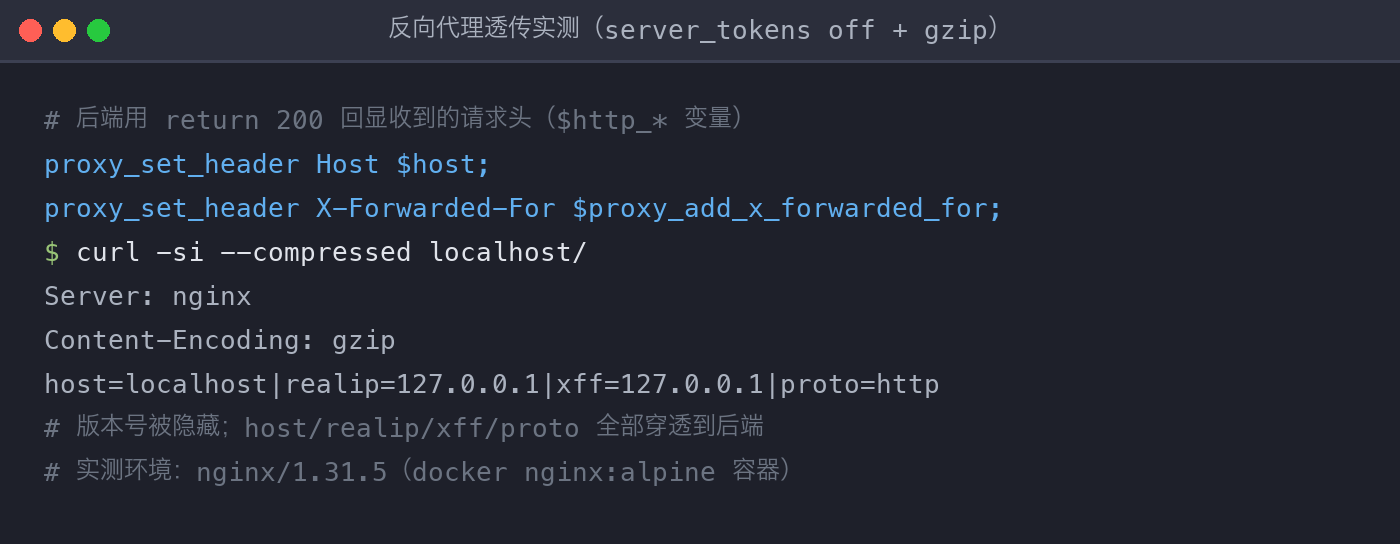
读图:Server: nginx 后面没有版本号(server_tokens off 生效,默认是 Server: nginx/1.31.5);Content-Encoding: gzip 说明压缩开启;最后那行是后端服务回显收到的请求头——Host、X-Real-IP、X-Forwarded-For、X-Forwarded-Proto 四个变量全部穿透到了后端,透传链路工作正常。
SSL/TLS 与强制跳转
1 | server { |
证书和私钥路径要对、Nginx 进程有读权限,证书链要完整——只部署叶子证书时部分客户端会直接拒连,把中间证书拼进 crt 文件(cat domain.crt intermediate.crt > fullchain.crt)能省掉一大半”浏览器能打开、命令行报证书错误”的排查。证书来源两条路:公网站点用 Let’s Encrypt 的 certbot 签发续期,内网站点自建 CA 或直接用内部证书。HSTS 头让浏览器一年内强制走 HTTPS,注意它开了就难以快速回退,上线前确认 HTTPS 已稳定。
负载均衡
1 | upstream backend { |
upstream 定义后端池,默认轮询,性能不均用 weight 加权;会话粘滞场景用 ip_hash(同 IP 固定投同一台)或 least_conn(投给当前连接数最少的),按业务特征选。proxy_next_upstream 让报错/超时的请求自动改投下一台,是简单有效的故障转移。
缓存
1 | proxy_cache_path /var/cache/nginx levels=1:2 keys_zone=my_cache:10m |
proxy_cache_path 必须先声明(缓存存储路径 + 键区),proxy_cache 在 location 里启用。X-Cache-Status 响应头直接告诉你每次请求是 HIT(命中)还是 MISS(回源),调缓存先看它。实测连打两次同一请求(后端响应带 Cache-Control: public, max-age=60,可被缓存):
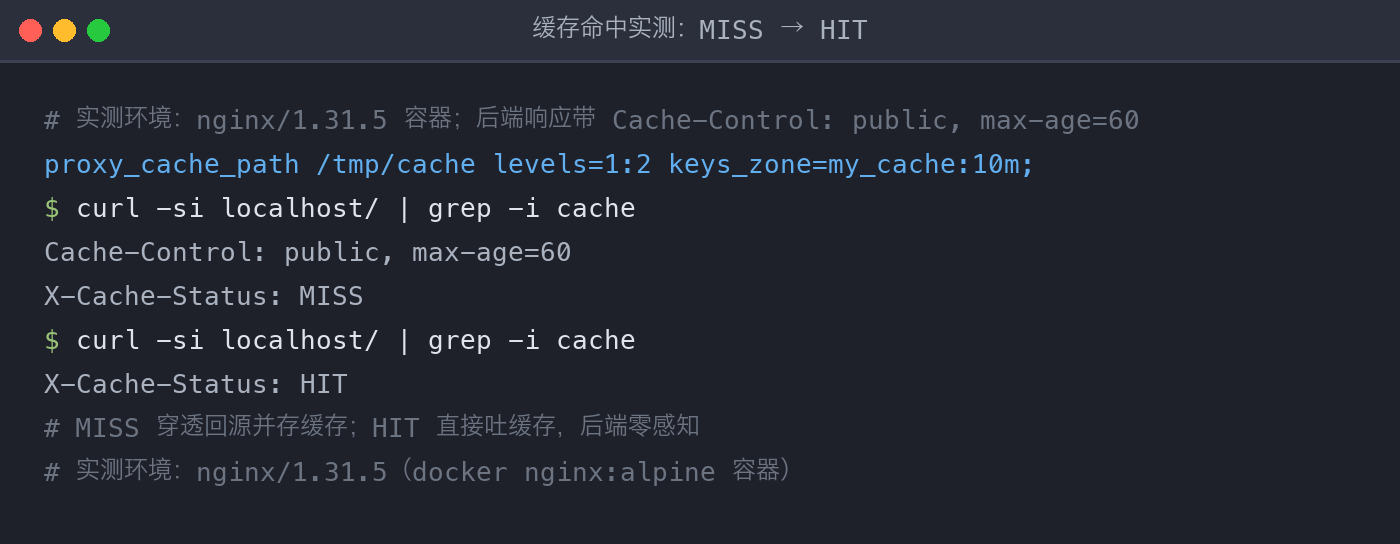
第一次 MISS——缓存区还是空的,请求穿透到后端,响应在返回的同时被存进缓存区;第二次 HIT——响应直接从缓存区吐出,后端没有收到这次请求。生产上排查”数据是旧的但后端明明没故障”这类问题,第一步就是看这个头:HIT 说明读者拿到的正是缓存里的那一份。
安全加固
1 | server_tokens off; # 响应头不暴露版本号 |
隐藏版本号一行搞定(上图实测可见);限速限连按来源 IP 收口,是对抗 CC/DDoS 的基础防线,参数宁松勿紧,观察日志再收紧。
速查表
| 指令 | 作用 | 常用取值 |
|---|---|---|
worker_processes |
worker 进程数 | auto |
worker_connections |
单 worker 最大连接数 | 1024~65535 |
include |
引入子配置 | conf.d/*.conf |
proxy_pass |
反向代理转发 | http://backend |
proxy_set_header |
向后端透传请求头 | Host/X-Real-IP/X-Forwarded-* |
return 301 |
强制跳转 | https://$host$request_uri |
server_tokens off |
隐藏版本号 | 固定写法 |
limit_req |
限制请求速率 | zone=one burst=5 |
proxy_cache |
启用响应缓存 | 与 proxy_cache_path 配套 |
注意事项
- 改完配置先
nginx -t验证语法再 reload,include进来的文件同样会被检查。 alias路径必须以/结尾,少了会出 404。- 反向代理务必带上
proxy_set_header系列,否则后端拿到的客户端信息全是错的。 - HSTS 开了就难以快速回退,上线前确认 HTTPS 已稳定。
- 限速限连参数宁松勿紧,观察日志再逐步收紧。
本文由作者 2020-2024 年间的 CSDN 博客文章重构而来,原发布于 CSDN。